Hello! This is the Galaxy Store Seller Portal team.
Thank you for using Seller Portal and for your continued interest.
Google's new Android security policy, Android Developer Verification (ADV), will first be rolled out in Brazil, Indonesia, Singapore, and Thailand starting September 30, 2026.
Sellers distributing apps through Galaxy Store must complete ADV registration before the policy takes effect to avoid service disruption.
■ What is Android Developer Verification(ADV)?
Android Developer Verification(ADV) is Google's new security program designed to prevent malicious apps from being installed on Android devices.
Under this policy, developers distributing Android apps through Google Play, third-party app stores such as Galaxy Store, or sideloading must verify their identity and register ownership of their app package name and signing certificate with Google.
■ Impact of Not Completing ADV
If ADV identity verification and app ownership registration are not completed, installation of affected apps will be blocked at the Android OS level on devices running Android 8.0 or later in the countries where the policy takes effect(Brazil, Indonesia, Singapore, and Thailand), starting September 30, 2026.
• Exceptions: Apps distributed exclusively in Mainland China, Watch apps, Stickers, Themes, Wallpapers, AOD, Icons, Instant Play 1.0/2.0 apps continue to operate normally, independent of the ADV policy.
• Google plans to expand ADV globally in 2027
■ Changes for Galaxy Store Users After the Policy Takes Effect
After September 30, ADV-unapproved apps will be handled as follows:
• Hidden from Galaxy Store
Apps that have not been approved under ADV and are subject to installation blocking will no longer appear in Galaxy Store search results or app listings.
• Re-downloads and Updates Blocked
Even users who have previously installed or downloaded the app will not be able to reinstall or update it.
• No Impact on Existing Installations
Apps that are already installed can continue to be used normally, and app launch will not be affected.
• Purchase Information Remains Available
Existing purchase records, such as coupons and payment receipts, will remain accessible.
However, in the case of coupons, since app downloads are blocked when ADV is not approved, some coupons may not be usable depending on their type.
■ Galaxy Store Seller Portal Updates
To support sellers in complying with the ADV policy, the Seller Portal will be updated as follows:
• Starting July 29: Binary ADV Status Check
Sellers can check the ADV verification status of uploaded binaries.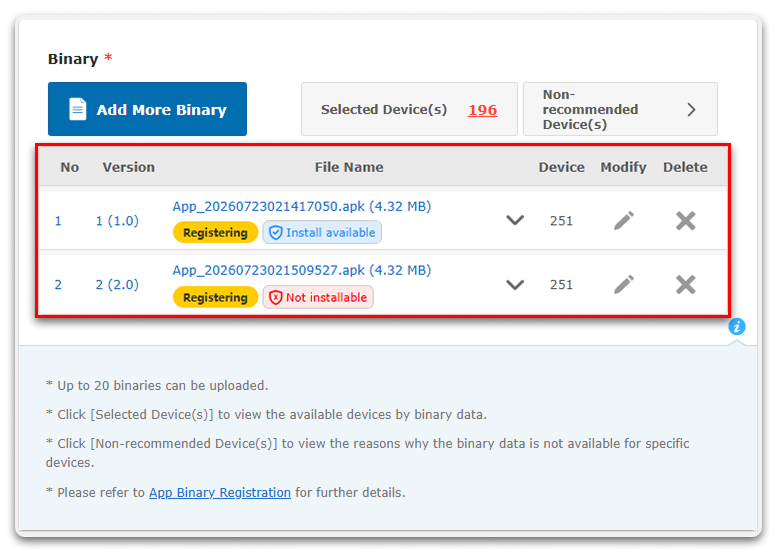
• Installable: The binary has successfully completed ADV approval and can be distributed and installed normally.
• Not Installable: The binary has not completed ADV approval. Please complete developer identity verification and register the signing key in Google ADC(Android Developer Console).
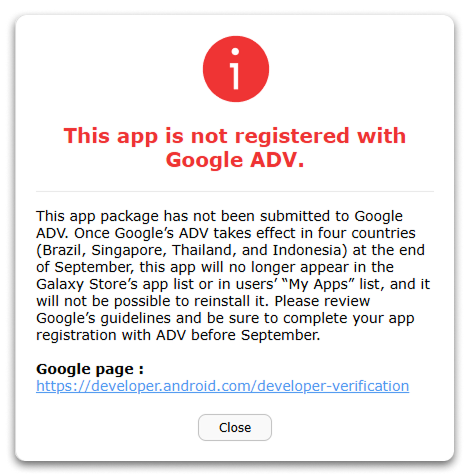
• If an app with a Not Installable status is distributed in Brazil, Indonesia, Singapore, and Thailand, a warning notification will be displayed. In this case, an "ADV Verification Required" icon will also be shown in the app list.
• To be implemented in September 2: Submission Block for ADV-Unapproved Apps
New app registrations and update submissions through Seller Portal will be completely blocked for apps that include ADV-unapproved binaries.
■ Required Actions for Sellers(ADV Approval Process)
To prevent service disruption, sellers who have not yet completed ADV registration should complete the following steps as soon as possible.
• Case 1: AAB apps using "App Signing by Galaxy Store"
Since Galaxy Store performs the final app signing, sellers must add the Galaxy Store signing key to the signing certificate list for the app package in Google ADC.
1. Check Seller Portal: Copy the SHA-256 fingerprint of the Galaxy Store signing key from Galaxy Store Seller Portal.
2. Add the Key in Google ADC: Sign in to Google ADC and add the copied Galaxy Store signing key SHA-256 fingerprint to the Signature Key list for the corresponding app package.
• Case 2: The package name has already been released on another app store, but uses a different signing key for Galaxy Store.
1. Add the Key in Google ADC: Sign in to Google ADC and add the SHA-256 fingerprint of the signing key used for the Galaxy Store version to the Signature Key list for the same app package.
• Case 3: A new package name created exclusively for Galaxy Store that has never been registered on another app store(such as Google Play)
1. Request Direct Approval in Google ADC: Sign in to Google ADC and submit the app package name together with the SHA-256 fingerprint of the signing key registered in Seller Portal.
If you have any questions, please select Seller Portal > Help > Contact us.
Thank you.
Galaxy Store Seller Portal Team





